




Logge dich ein, damit es beim Checkout schneller geht.



Sprache
Display currency
We'll take you to the best site for your location.
In a market filled with expensive Hall Effect keyboards, the K686 HE stands out by delivering the features gamers want most without the premium price. That's what makes it such an easy recommendation.
Final Score: 8.8

Table of Content
Back in April, I had the opportunity to review the Redragon K556 HE, my first Hall Effect keyboard. More recently, Redragon provided me with the EISA K686 HE for review, giving me the chance to see how a compact 98% Hall Effect keyboard compares to the full-size layouts I have used for years.
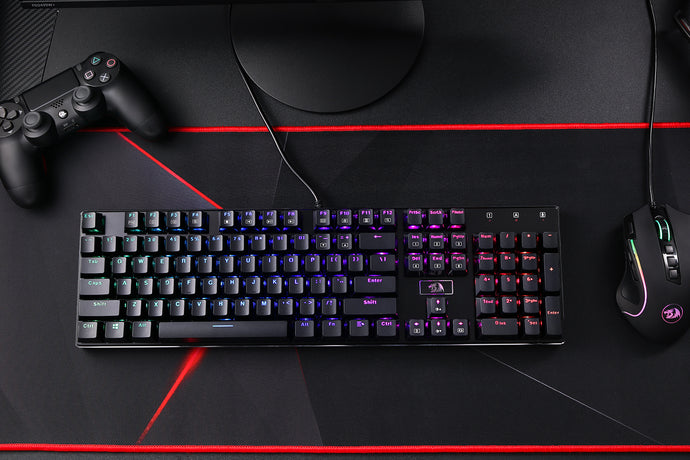
For the past seven months, my daily driver has been the Redragon K761, so moving to a smaller keyboard was a significant change. The first thing I noticed was the size difference. The K686 HE is approximately 2 inches narrower than my K761, giving it a noticeably smaller footprint while still retaining nearly all of the keys and functionality I use on a daily basis. Despite its smaller size, I did not gain any practical mouse space since I use the Redragon Drake Oath "Raina" glass mousepad, which already provides more than enough room for gaming. Instead, the benefit of the compact layout is a cleaner, less cluttered desk setup.
One small but thoughtful design choice I immediately appreciated was the placement of the USB-C port on the left side of the keyboard. The included right-angle cable works perfectly with this layout, making cable routing simple and helping maintain a clean appearance on my desk.
The K686 HE packs an impressive feature set that includes UltraMag magnetic switches, Rapid Trigger technology, 8K hyper-polling, a multifunction control knob, and multiple layers of sound dampening. Redragon positions the keyboard as a high-performance gaming board, but after spending time gaming, typing, and using it for everyday tasks, I found that its strengths extend beyond gaming alone. The switches feel smooth and responsive, the acoustics are pleasant, and the overall typing experience is enjoyable for extended periods of use. Redragon specifically advertises UltraMag magnetic switches, Rapid Trigger support, 8K polling, and integrated noise dampening on the K686 HE
As someone who has always used 100% keyboards, there has been a small adjustment period. I still occasionally find myself glancing down to locate certain keys, but that is more a matter of breaking years of muscle memory than a flaw with the keyboard itself. The transition to the 98% layout has been much easier than I expected.
In this review, I will take a closer look at the K686 HE's build quality, switches, typing experience, gaming performance, RGB lighting, software, and overall value to determine whether this compact Hall Effect keyboard is worth a place on your desk.
| Feature | Description |
|---|---|
| Layout | 96% 98-key |
| Mount Style | Gasket Mount |
| Plate | Polycarbonate |
| Switches | UltraMag magnetic switches |
| Dampening | Five-Layer Acoustic Stack |
| Connectivity | USB-C |
| Hot-Swap | Only with UltraMag switches |
| Control Knob | Media and backlight |
| RGB | 20 Built-In Effects |
| NKRO | Full N-Key Rollover |
| Keycaps | PBT Shine-Through |
| Weight | 899g |
| Specification | Value |
|---|---|
| Operating Force | 35 ± 5gf |
| Adjustable Actuation distance | 0.1mm to 3.4mm |
| Bottom-Out Force | 45 ± 5gf |
| Wired Polling | 8000Hz |

The Redragon EISA K686 HE arrives in a well-presented retail box that clearly highlights the keyboard's key features, including its Hall Effect switches, Rapid Trigger functionality, and compact 98% layout. The packaging provides adequate protection during shipping, and everything inside was securely packed with no signs of damage upon arrival.
Opening the box reveals the keyboard itself, protected by foam and a dust cover. The presentation is straightforward and focused on getting the keyboard ready for use with minimal setup required.
Inside the box, you will find:
The included right-angle USB-C cable deserves special mention. Thanks to the keyboard's left-side USB-C port, the cable routes neatly across the desk and helps maintain a clean setup.
While the accessories package is not extensive, it includes everything needed to get started immediately. The keycap and switch puller are useful additions for maintenance and customization, and the inclusion of spare switches is always appreciated. The K686 HE user documentation lists a USB cable, keycap/switch puller, and spare switches among the included items.
My first impression of the K686 HE was how compact it looked compared to my daily driver, the K761. At roughly 2 inches narrower, it takes up noticeably less desk space while still retaining a familiar layout. The keyboard felt solid straight out of the box, and the clean design gave it a more premium appearance than I expected for its price point.
At 899 grams, the Redragon EISA K686 HE feels sturdy and well-built, with a solid chassis that shows minimal flex. The keyboard has a premium feel on the desk, and the keycaps and switches feel durable for long-term use. The overall construction inspires confidence for both gaming and everyday typing.
The K686 Pro utilizes a rigid polycarbonate plate without flex cuts and a sophisticated five-layer dampening system.

| Layer | Purpose |
|---|---|
| 3.5mm Poron Foam | Absorbs switch harshness |
| IXPE Switch Foam | Softens switch acoustics |
| PET Sound Pad | Controls sound transmission |
| Bottom Socket Foam | Reduces resonance |
| Silicone Base | Dampens vibrations |

The Hall Effect switches on the Redragon EISA K686 HE are one of its standout features. They feel exceptionally smooth straight out of the box, with very little friction during keypresses. The keystrokes are consistent across the keyboard, providing a predictable and reliable typing experience.
For gaming, the switches offer quick response times and precise actuation, making movement, aiming, and rapid inputs feel effortless. Since Hall Effect switches rely on magnetic sensing rather than physical contacts, keypresses feel clean and consistent even during fast-paced gaming sessions.
For typing, the switches provide a smooth linear feel that allows fingers to glide from key to key without resistance. This results in a comfortable experience during long work or study sessions. The combination of smooth travel and stable keypresses gives the keyboard a more premium feel than many keyboards in its price range.
The stabilizers are well executed and contribute significantly to the keyboard's overall feel. Larger keys such as the Spacebar, Enter, Backspace, and Shift feel stable with minimal side-to-side wobble. This helps create a more refined typing experience and prevents the larger keys from feeling loose or uneven.
Acoustically, the stabilizers are relatively well-tuned, producing a clean sound with little rattling. The spacebar in particular feels solid and controlled, which enhances both the sound profile and typing satisfaction. Combined with the keyboard's gasket-mounted design and internal dampening materials, the stabilizers help deliver a deeper and more consistent typing sound.
The Redragon EISA K686 HE delivers a typing experience that feels surprisingly refined for its price point. From the first few keystrokes, the keyboard feels smooth, controlled, and comfortable. The Hall Effect switches glide effortlessly through their travel, requiring minimal force to actuate while maintaining a consistent feel across the entire board.
One of the keyboard's strongest qualities is its sense of stability. Each keypress feels solid and well-supported, with very little wobble. This creates a confident typing experience where keys feel precise rather than loose or shaky. Whether typing quickly or slowly, the keyboard maintains a consistent feel that helps improve accuracy and overall comfort.
The gasket-mounted design adds a slightly cushioned sensation when bottoming out. Instead of a harsh impact, keystrokes feel softer and more forgiving. This becomes especially noticeable during long writing sessions, where the keyboard remains comfortable and reduces finger fatigue compared to stiffer tray-mounted designs.
Another highlight is the keyboard's acoustics. The combination of internal dampening, well-tuned stabilizers, and smooth switches produces a deep, clean sound profile. The keyboard avoids excessive hollowness or metallic ping, giving each keystroke a satisfying and premium character. Larger keys such as the spacebar, Enter, and Backspace sound consistent with the rest of the board, which further enhances the typing experience.
For productivity tasks, the K686 HE feels fast and responsive, making it easy to maintain a steady typing rhythm. For gaming, the Hall Effect technology provides immediate and accurate input registration, allowing rapid key presses without sacrificing control.

The Redragon EISA K686 HE performs exceptionally well in gaming, largely thanks to its Hall Effect switch technology. Key presses feel fast, accurate, and highly responsive, allowing commands to register instantly during gameplay. This responsiveness is particularly noticeable in competitive titles where quick reactions and precise movement are important.
The keyboard's smooth switches make rapid inputs effortless, whether you are strafing in FPS games, executing combos in fighting games, or performing repeated actions in MOBAs and MMOs. Since the switches provide a consistent feel across the board, it is easy to build muscle memory and maintain accuracy during intense gaming sessions.
The stable construction also contributes to the gaming experience. Keys remain steady even during aggressive use, while the well-tuned stabilizers ensure larger keys such as Spacebar and Shift feel reliable and predictable. This consistency helps maintain confidence during fast-paced gameplay.
Wireless performance is also dependable for everyday gaming, while the wired connection provides the most stable experience for competitive play. The compact 98% layout keeps essential keys within easy reach while leaving more room for mouse movement, which many gamers will appreciate.
Another advantage is the keyboard's comfortable acoustics and typing feel. Long gaming sessions remain enjoyable because the switches are smooth, the sound profile is pleasant, and the gasket-mounted design helps soften keystrokes without feeling sluggish.
Gaming Verdict: The Redragon EISA K686 HE is an impressive gaming keyboard that combines responsive Hall Effect switches, smooth key feel, and a solid gasket-mounted design into a well-rounded package. Its fast and accurate input registration, stable keys, and comfortable acoustics make it equally suited for competitive and casual gaming. While there are more expensive Hall Effect keyboards on the market, the K686 HE delivers excellent performance and value, making it an easy recommendation for gamers looking to upgrade to magnetic switches without breaking the bank.
Wired only: 8K Hyper-polling rate

RGB Features
The RGB lighting on the Redragon EISA K686 HE is vibrant, and highly customizable, adding both style and functionality to the keyboard. The lighting shines evenly across the keys, making legends easy to see in darker environments while also enhancing the overall aesthetic of a gaming setup.
With a variety of built-in lighting effects, users can easily switch between dynamic animations, reactive effects, and static colors to match their preferences. The RGB illumination complements the keyboard's modern design without feeling overly distracting, allowing users to create anything from a subtle professional look to a colorful gaming-focused setup.
The brightness levels are sufficient for both daytime and nighttime use, and the smooth transitions between effects contribute to a polished appearance. Combined with the keyboard's overall build quality, the lighting helps give the K686 HE a more premium feel.
While I would have liked slightly higher maximum brightness, especially during daytime use, visibility remained good under most lighting conditions.
Rather than trying to illuminate the room, the RGB feels intentionally balanced. It enhances usability while remaining comfortable during long gaming or productivity sessions.
RGB Effects Chart
| Effect | Description |
|---|---|
| Static | Single color lighting across the entire keyboard. |
| Neon | Multi-color static effect with predefined color zones. |
| Breath | Lighting gradually fades in and out. |
| Wave | Colors move across the keyboard in a flowing pattern. |
| Twinkle | Random keys illuminate and fade like stars. |
| Radar | Rotating or sweeping illumination effect. |
| Auto Ripple | Ripple effect occurs automatically across the keyboard. |
| Striation | Banded lighting effect moving across rows or columns. |
| Aurora | Multi-color flowing gradient effect. |
| Ripple | Keypresses generate expanding light waves. |
| Reactive | Keys light up when pressed and fade afterward. |
| Cross | Cross-shaped lighting pattern centered on keypresses. |
| Fire | Burst lighting effects triggered from keystrokes. |
| Speed Respond | Lighting response varies with typing speed. |
| Musical Rhythm | RGB reacts to audio or music playback. |
| Custom | User-defined per-key RGB configuration. |
✅ Pros
❌ Cons
RGB Verdict: While the K686 HE offers a decent selection of RGB effects and customization options, the brightness is somewhat underwhelming compared to similarly priced gaming keyboards. The lighting is still attractive in darker environments but lacks the intensity and visual impact of stronger RGB implementations.
The control knob is a practical addition that improves the overall user experience by providing quick access to commonly used functions without relying on keyboard shortcuts. It feels responsive and is easy to reach, making adjustments convenient during both gaming and everyday use.
The knob can be used to control functions such as volume adjustment, and it can also be used for media and lighting controls. This allows users to make quick changes without interrupting their workflow or gameplay.
✅ Pros
❌ Cons
Verdict: A useful quality-of-life feature that makes adjusting volume and media settings fast and convenient. It enhances the keyboard's functionality without taking up extra space and fits naturally into daily use.
The software is one of the most important features of the K686 HE because it unlocks much of the keyboard's customization potential. While the keyboard functions perfectly well out of the box, the software allows users to personalize lighting, key functions, and macros to better suit their gaming and productivity needs.
One of the biggest highlights is the RGB customization. Users can adjust colors, brightness, animation speed, and lighting effects, while also creating custom profiles rather than relying solely on preset modes. This makes it easy to match the keyboard to a specific setup or personal aesthetic.
The software also supports key remapping, allowing users to reassign keys and create custom shortcuts. This can be particularly useful for gamers seeking optimized controls, as well as professionals who depend on frequently used keyboard commands and workflow shortcuts.
For Hall Effect functionality, the software includes an Advanced Actuation Settings section and a built-in calibration tool. Before taking full advantage of adjustable actuation and rapid trigger features, it is recommended to calibrate the keyboard. This process ensures the Hall Effect sensors accurately detect key travel and provide consistent actuation performance across all keys. Individual keys can also be calibrated as needed, allowing users to fine-tune sensor behavior for optimal accuracy and responsiveness.
Macro support is another valuable feature. Complex commands and repetitive actions can be assigned to a single key, improving efficiency in both games and productivity applications. Custom profiles further enhance flexibility, allowing users to quickly switch between different configurations for gaming, work, or general everyday use.
However, the software itself is fairly basic compared to offerings from larger gaming brands. The interface is functional rather than modern and navigating some settings can take a little time. While it provides the essential tools most users will need, it lacks the polish and advanced ecosystem integration found in software suites from some premium competitors.
Because the Redragon K686 HE features robust onboard memory, any settings you save via the web-based driver are burned directly onto the keyboard's internal chip.
✅ Pros
❌ Cons
Software: The K686 HE software delivers all the core features expected from a modern gaming keyboard, including RGB customization, macros, and key remapping. While the interface is not the most polished, it is functional, reliable, and provides enough customization to satisfy most users. It may not be a major selling point, but it successfully complements the keyboard's strong hardware features. Most importantly, settings are stored onboard and software overhead remains very low.
✅ Competitive Gamers
✅ Users Upgrading from a Standard Mechanical Keyboard
✅ Gamers Who Value Typing Feel
✅ People Looking for a Feature-Rich Keyboard
✅ Students, Professionals, and Content Creators
❌ RGB Enthusiasts
❌ Software Power Users
❌ Ultra-Premium Keyboard Enthusiasts
The Redragon EISA K686 HE is ideal for gamers and everyday users who want Hall Effect performance, solid typing feel, good acoustics, and strong value for money. It delivers where it matters most: gaming performance, typing comfort, and overall functionality, making it one of the better value-focused Hall Effect keyboards available today.
✅ Pros
❌ Cons
Pros outweigh the cons by a wide margin. The Redragon EISA K686 HE delivers smooth Hall Effect switches, excellent gaming performance, satisfying acoustics, and solid build quality at a competitive price. While the RGB brightness and software could be improved, they do little to detract from an otherwise outstanding all-around keyboard.
The Redragon EISA K686 HE is an impressive Hall Effect keyboard that delivers where it matters most. Its smooth magnetic switches, excellent gaming performance, satisfying typing feel, and solid build quality combine to create a keyboard that feels more premium than its price suggests. The gasket-mounted design and well-tuned stabilizers contribute to a comfortable and enjoyable experience whether you are gaming, working, or typing for extended periods.
While the software could be more polished and the RGB lighting is not as bright as some competitors, these shortcomings are minor compared to the keyboard's overall strengths. Features such as the multifunction control knob, customizable software, and strong switch performance make it a well-rounded package. The K686 series also includes RGB lighting customization, macro support, and knob-based media/lighting controls.
Overall Score: ⭐ 8.8/10
The Redragon EISA K686 HE is an excellent choice for gamers and enthusiasts looking to experience Hall Effect technology without paying a premium price. It offers smooth performance, great acoustics, and strong value for money, making it one of the best budget-friendly Hall Effect keyboards currently available.

The Redragon K686 HE software is where the keyboard's Hall Effect capabilities truly come to life. Out of the box, the keyboard functions as a standard gaming keyboard, but features such as adjustable actuation points, Rapid Trigger, Snap Tap, SOCD, custom RGB profiles, macros, and key remapping all require the software.
Upon launching the software, users are greeted with a visual representation of the keyboard in the center of the screen and a navigation menu along the left side. The software layout is simple and easy to navigate, with all major features available through dedicated sections.
The main sections include:
When opening the software, the first thing users will see is the connected keyboard listed on the left side under Device List.
In my case the keyboard appeared as: K686BG-RGB-M (USB)
Selecting the keyboard loads all available settings and customization options.
At the bottom of the device list is a Reset button.
The Reset button restores the currently selected profile back to its default settings.
This is particularly useful if:
Rather than manually undoing every change, the keyboard can be returned to a known working configuration.
The Keymap section allows users to customize the function of individual keys.
Clicking a key on the keyboard image highlights it for modification.
Users can assign:
Example Uses
Many gamers choose to disable the Windows key to prevent accidentally tabbing out during gameplay.
Content creators may assign frequently used shortcuts to less commonly used keys.
Office users can map calculator, browser, or productivity functions to spare keys.
The keyboard graphic updates automatically as changes are made.
The Actuation Settings page is arguably the most important section of the software.
This menu controls how far a key must physically travel before it activates.
Traditional mechanical keyboards have a fixed actuation point.
The K686 HE allows adjustment anywhere between approximately 0.1mm and 3.4mm.
The keyboard graphic displays current actuation settings and allows per-key customization.
Users may either:
This allows different actuation settings to be applied to different parts of the keyboard.
For example:
Gaming Configuration
| Key | Actuation |
|---|---|
| WASD | 0.1mm |
| Shift | 0.2mm |
| Space | 0.3mm |
| Function keys | 2.0mm |
This setup prioritizes speed while reducing accidental presses on less frequently used keys.
The actuation slider adjusts how sensitive keys become.
| Actuation | Sensitivity | Ideal for |
|---|---|---|
| 0.1mm | Extremely sensitive. | Valorant, CS2, Apex Legends, Competitive FPS games Drawbacks: Easy accidental key presses |
| Around 1.0mm | Balanced sensitivity. | General gaming, Everyday use This is where I found the keyboard most comfortable. |
| 2.0mm+ | Less sensitive. | Typing, Office work, Productivity |
The Lighting Settings page controls RGB customization.
Unlike many budget keyboard applications, the K686 HE software provides a large number of effects and customization options.
At the bottom of the page are sliders for:
Color controls allow:
The software currently provides:
Each effect offers varying levels of customization.
Brightness can be adjusted through a dedicated slider.
The changes are applied in real time, making it easy to find a comfortable level.
One thing I noticed during testing is that the RGB lighting is not particularly bright compared to some competing gaming keyboards. While reducing the brightness works well, even the maximum setting remains somewhat subdued.
Dynamic effects such as:
allow adjustment of animation speed.
Slower speeds create a more subtle appearance.
Faster speeds produce a more energetic gaming aesthetic.
Certain lighting effects support directional movement.
The software provides multiple directional icons allowing animations to move:
Custom mode allows individual key customization.
Users can click keys directly on the keyboard image and assign colors.
Popular examples include:
FPS Layout
| Color | Keys |
|---|---|
| Red | WASD |
| Blue | Numbers |
| Green | Ability Keys |
Productivity Layout
| Color | Keys |
|---|---|
| Yellow | Numpad |
| White | Main Typing Area |
| Blue | Function Row |
The Special section contains advanced Hall Effect functionality.
This area may vary depending on firmware version.
Common options include:
These settings directly impact keyboard responsiveness.
Rapid Trigger is one of the K686 HE's standout features.
When enabled, keys reset as soon as upward movement is detected rather than waiting for a fixed reset point.
Configuration Steps
Competitive players will often pair Rapid Trigger with lower actuation settings.
The Advanced Key section controls advanced Hall Effect behaviors.
Depending on firmware version, options may include:
This section is intended for power users who want additional input customization beyond traditional keyboard behavior.
PRCS contains several of the most advanced gaming-related settings on the keyboard.
This is where users can configure:
Snap Tap prioritizes the most recently pressed directional key.
Example
Hold A → Then press D → The keyboard immediately prioritizes D.
This creates extremely responsive movement transitions and is particularly beneficial in competitive shooters.
SOCD stands for:
Simultaneous Opposing Cardinal Directions
This determines how the keyboard behaves when opposite movement keys are pressed.
Example: A + D or W + S
The software allows users to define which input receives priority.
The Macro List section is used to create and manage macros.
Users can:
Typical Uses
Gaming:
Productivity:
Once created, macros can be assigned through the Keymap section.
At the lower-right corner of the software is the profile selector.
Profiles allow users to save multiple configurations.
Examples:
Profile 1
General Use
Profile 2
Competitive Gaming
Profile 3
Typing
Each profile stores:
This makes switching between tasks fast and convenient.
While the software lacks the polish of larger gaming brands, it provides access to every major Hall Effect feature users are likely to need. The interface is straightforward, settings are easy to locate, and changes are applied quickly. More importantly, the software exposes the full potential of the K686 HE, allowing users to customize everything from RGB lighting and macros to actuation distance, Rapid Trigger behavior, Snap Tap, and SOCD settings. For anyone interested in exploring what a Hall Effect keyboard can do, the software is an essential part of the K686 HE experience.
Custom mode allows individual key lighting.
Red: WASD
Blue: Numbers
Green: Abilities
Yellow: Numpad
Blue: Function keys
White: Main typing area
The Keymap section allows:
One useful modification is disabling the Windows key while gaming.
The Macro List section allows recording keyboard sequences.
Example
CTRL+C
pause
CTRL+V
can be assigned to a single key.
Great for:
For anyone new to Hall Effect keyboards, I recommend:
This setup showcases the benefits of Hall Effect technology without making the keyboard feel overly sensitive, and it provides an excellent balance between gaming performance and everyday usability.
For precise control over which keys use Snap Tap and how they prioritize inputs, use Redragon's web driver or downloadable software.
1. Connect the keyboard: Plug your Redragon K686 HE into your PC using its wired USB-C cable.
2. Open the web hub or software: Navigate to the official web-based driver via the Redragon Shop Web Hub Platform or open software.
3. Open PRCS settings: Look for the PRCS menu (also labeled as SOCD or Snap Tap in some software versions).
4. Assign your keys: Click Create, then select your main strafe keys (typically A and D).
5. Select your processing model: Choose how you want the keyboard to resolve overlapping key presses:
6. Save changes: Click Save to Device to lock in your settings.
The K686 HE's SOCD and directional priority options add another layer of customization for serious gamers. While these settings can be intimidating to new users, they provide meaningful control over character movement once understood. Snap Tap in particular can make directional changes feel faster and more immediate during competitive play. Most casual users will likely leave these settings at their defaults, but enthusiasts and FPS players will appreciate having access to these advanced Hall Effect features.
This review contains a considerable amount of information because the K686 HE is a feature-rich keyboard with capabilities that go far beyond those of a traditional mechanical keyboard. From Hall Effect switches and Rapid Trigger technology to customizable actuation points, SOCD settings, RGB lighting, and software customization, there is a lot to cover for both new and experienced users.
To make the review easier to read and navigate, I have divided it into clearly defined sections. This allows readers to quickly jump to the topics that matter most to them, whether that's gaming performance, typing experience, build quality, software features, RGB lighting, or advanced Hall Effect functionality.
If you're simply looking for a solid gaming keyboard, you can focus on the typing and gaming sections. If you're interested in getting the most out of the Hall Effect switches, the software and PRCS sections provide a deeper look into the advanced customization options available on the K686 HE.
No single keyboard is perfect for everyone, but by breaking each feature down individually, my goal is to help you determine whether the Redragon EISA K686 HE is the right fit for your needs, preferences, and gaming style.
