




Inicia sesión para finalizar tus compras con mayor rapidez.


Idioma
Display currency
We'll take you to the best site for your location.
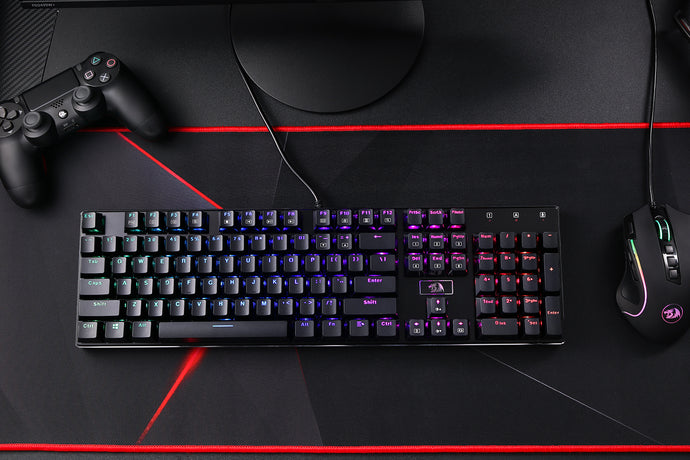
The Antonium K745 PRO is the kind of keyboard that makes full-size layouts feel fun again. In purple, it looks fantastic, and the gasket structure plus five layers of dampening keep the sound crisp and clean without turning every keystroke into a hollow clack.
As a versatile option among modern gaming keyboards, it offers tri-mode connectivity, hot-swap support, and four extra shortcut keys. For anyone considering full-size mechanical keyboards for both work and play, this is a practical daily driver that feels right at home on a desk or in a gaming setup.

| Spec | Details |
|---|---|
| Price (listed) | $64.99 USD |
| Layout | Full size (108-key matrix) + 4 extra shortcut keys |
| Mount / feel | Gasket structure with dampened, cushioned keystrokes |
| Connectivity | USB-C wired, Bluetooth 3.0/5.0, 2.4 GHz wireless (tri-mode) |
| Switches | Mint Mambo linear (factory lubed) |
| Hot-swap | Upgraded hot-swap sockets (3/5-pin compatible) |
| Keycaps | Round PBT keycaps with mixed accent colors |
| Lighting | RGB |
| Anti-ghosting | 104 keys anti-ghosting |
| Weight | 1.06 kg |
| Dimensions | 17.52 x 5.59 x 1.50 inches |
| Included extras | Nano receiver, USB-C cable, keycap and switch puller, 4 extra Mint Mambo switches, manual, sticker |
The first thing you notice on the purple K745 PRO is that Redragon leaned into a clean, modern look without over-styling it. The case feels substantial (it tips the scale at 1.06 kg), which helps keep the board planted during fast typing or gaming. It is a full 108-key layout, so you keep the numpad and navigation cluster, plus four dedicated shortcut keys in the top-right. Those extra keys are genuinely useful for media controls, productivity shortcuts, or macros.

For a full-size keyboard, comfort matters more than people admit. The K745 PRO includes two-stage adjustable feet, so you can set a low, medium, or steeper typing angle depending on your wrist position and desk setup. There is no bundled wrist rest, but the front edge height is reasonable for most desks, and the heavier chassis keeps it from creeping forward.
This is where the K745 PRO punches above its price. Redragon’s gasket structure uses precision-locked covers with gaskets to add flex and reduce case vibration. On top of that, the keyboard is built with five layers of noise control materials (including plate foam, switch foam, sound pads, and a silicone bottom pad). The result is a clean, controlled sound profile: clear without being sharp, and satisfying without sounding hollow.

The Mint Mambo linear switches are thick-lubed from the factory, which helps the board land closer to that smooth, cozy feel people chase in creamy keyboards. If you already like a crisp, clean keystroke sound, this board delivers it out of the box. And if you want to tune the sound further, the hot-swap sockets make switch experiments painless.
If you’re curious to learn more about what makes a keyboard “creamy,” check out our guide: What Is a Creamy Keyboard: Everything You Need to Know Before You Buy or Build.

The tri-mode part is not marketing fluff. You can run the K745 PRO via USB-C for a classic plug-and-play experience, hop to Bluetooth for a cleaner desk or laptop pairing, or use the included 2.4 GHz receiver when you want low-latency wireless without Bluetooth quirks. Switching modes is quick, and having multiple connection types makes this keyboard especially handy if you bounce between a desktop, a work laptop, and a personal device.

The K745 PRO leans into vibrant RGB, and it looks great under the rounded PBT keycaps. The south-facing LED orientation is a nice touch for enthusiasts, since it plays better with many keycap profiles and reduces the chance of interference on some switch and keycap combinations. The mixed accent keycaps add a bit of personality without turning the board into a carnival.

Redragon uses upgraded hot-swap sockets that support both 3-pin and 5-pin switches. That opens the door to trying different linear, tactile, or silent options without soldering. It also comes with a combined keycap and switch puller, plus four extra Mint Mambo switches in the box, which is a small but genuinely helpful inclusion for long-term ownership.
For customization, the K745 PRO supports Redragon’s software suite for remapping keys, setting macros, and dialing in RGB effects. It is a straightforward, practical approach: enough control to tailor the board to your workflow, without requiring deep firmware rabbit holes.
If you want a full-size keyboard that feels premium where it counts – typing feel, sound, and everyday usability – the Antonium K745 PRO is an easy recommendation. It’s one of those boards that makes you notice your own typing in a good way. The purple tri-mode version adds personality, the acoustics stay impressively clean, and the included extras (especially the extra switches) show that Redragon built this for people who actually live on their keyboard.
Score: 4.5 / 5