




Whether you’re a competitive gamer or a tech enthusiast, this is one question you’ve probably asked before:can you use a keyboard and mouse on PS5?
In 2026, the short answer is yes — but with a few important limitations. In this blog, I put that question to the test using the Redragon K719 keyboard and Elite Impact M913 mouse, two of Redragon’s latest and most versatile gaming peripherals.

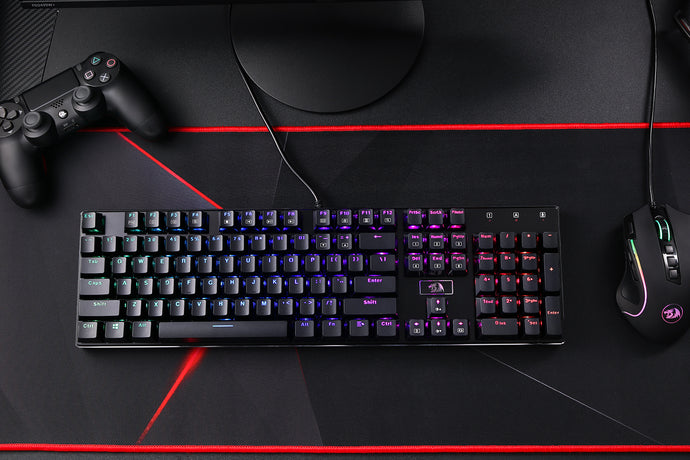
The Redragon K719 keyboard and Elite Impact M913 mouse. Both devices aretri-mode, supporting 2.4GHz wireless, Bluetooth, and wired USB connections. Using the included USB-A to USB-C cables, they can be directly connected to the PS5, while Bluetooth allows for a wireless setup with minimal hassle.
The K719 keyboard is equipped with a 4000mAh battery, making it well-suited for extended gaming sessions. The Elite Impact M913 offers up to 16,000 DPI, a 1000mAh battery, and 16 programmable buttons, giving it the flexibility and precision needed for console gaming.
For readers interested in more opinions, check out GALATIN PRO K719: YouTuber Reviews You Need to See to see real-life impressions and reviews of the K719 keyboard in action.
So it was the perfect combo to test out on PS5 for this blog, and some of the games I used these devices with were Final Fantasy XIV and Digimon Story: Time Stranger.

In terms of connectivity, the PS5 has come a long way since its predecessors. You can easily connect your keyboard and mouse via USB, but bear in mind that the PS5 only has two USB ports at the front of the console. With the Redragon K719 keyboard and Elite Impact M913 mouse, both devices came with wireless USB adapters, which occupied both front ports on my PS5.
However, I was using the original first model of the PS5, which has a total of four USB ports, so I still had two ports free at the back of the console.
Connectivity with newer keyboards, such as the Redragon keyboards, has become more advanced. Many keyboards and mice now offer wireless options while still including a cable for wired connections.
When I turned on Bluetooth on the keyboard and mouse, the PS5 was instantly able to detect both devices, and I could connect them without any issues. Bluetooth connectivity can be easily set up through the Settings → Accessories menu.
Once connected, both the keyboard and mouse settings can be customized in the Accessories menu. You can adjust the mouse cursor speed and configure the right and left mouse buttons to your preference.
STEP 1: Plug in your keyboard and mouse USB cables into the back of the PS5 in the blue USB ports.
STEP 2: Your user profiles will pop up on screen. You should see a little keyboard sign above your profile icon. Use the directional keys on the keyboard (the arrows) to navigate to the profile you want to use, and press the ENTER button on the keyboard.
STEP 3: You will be logged into the menu screen of the PS5. Then you can use the arrow keys and ENTER again to select the game you want to play. For example, games such as Call of Duty will allow you to set key binds and functionality settings.

STEP 1: Turn on the Bluetooth wireless functionality on your keyboard and mouse.
STEP 2: Using your PS5 controller, navigate to the home screen and go to Settings.
STEP 3: Scroll down to Accessories and select Bluetooth Accessories.
STEP 4: Put your keyboard and mouse into Bluetooth pairing mode. They should then appear under the Bluetooth accessories.

Luckily, the K719 and M913 both allow you to toggle pairing mode and switch connectivity modes easily. When pairing the keyboard, you may need to enter a passkey.
For the mouse (the M913 I was using), make sure you insert the wireless dongle for both the mouse and keyboard into the USB ports on the back of the PS5.
As mentioned, some keyboards and mice may not even be compatible with the PS5. The best way to address this is to get a keyboard that supports both wireless connectivity and USB connections, so if one method doesn’t work, you can try the other.
Another issue is beyond our control — it depends on whether game developers allow the use of a keyboard and mouse on PS5. More and more developers are expanding their games to support this functionality, making games more accessible to a wider range of players.

Using a keyboard and mouse on the PS5 breaks a lot of barriers for gamers.
Some of the best advantages are that you can write and respond to messages much faster than using the DualSense controller. For example, I was able to respond to friends’ messages quickly and chat a lot in FFXIV, as I belong to a free company. Being an MMO, FFXIV is already a perfect environment to use a keyboard and mouse, and the game supports keyboard and mouse on the PS5. The K719 handled this easily — the buttons are fluid, and the sound of the switches is quite relaxing when typing.
Another pro is that in some games, you can assign keys on both keyboard and mouse. For example, in FFXIV, I played as a Black Mage. When mashing spell combos, I could do so swiftly. With the Elite M913, I was able to make good use of the side buttons for heals and navigation. Some FPS games also support the use of keyboard and mouse on the PS5, giving players more precise control.
Not every game supports the use of a keyboard and mouse on the PS5. The main controller preference is often set to the DualSense, which can limit gameplay options in some titles.
Another downside is that not all devices are compatible — some may require a USB cable to register. Although connectivity has improved compared to older consoles, the PS5 sometimes does not support all keys on a keyboard and mouse. For example, in Digimon Story: Time Stranger, I could rebind keys, but the experience was not as smooth as on Steam, and a DualSense controller was recommended for smoother gameplay.
Additionally, menu navigation and other PS5 services still require the controller, which can be inconvenient as you may need multiple devices charged and ready. Lastly, the PS5 may be incompatible with some keyboards and mice, so it’s important to check instructions and game support to ensure your setup works as expected.

For this blog, I tested two main games: Final Fantasy XIV and Digimon Story: Time Stranger. These two games represent very different types of gameplay.
FFXIV is an MMO that fully supports keyboard and mouse. It has individual settings where you can choose between controller or keyboard and mouse. When using keyboard and mouse, you can easily bind your keys and customize modded settings. The game also adapts its UI depending on your input method, which is a fantastic system. Similar MMOs, like New World Aeternum, offer the same level of functionality.
Outside of MMOs, several other games on PS5 also support keyboard and mouse, including:
The key factor is that many of these games already have PC versions, making it easier to support keyboard and mouse functionality.
However, not all games support it. For example, Digimon Story: Time Stranger cannot be played with a keyboard and mouse on the PS5. This shows that compatibility still depends heavily on the game and its developers.


Stepping away from gaming, using a keyboard and mouse on a PS5 makes chatting with friends much easier. Browsing the internet is also faster and smoother compared to using the DualSense controller. Typing with a controller can feel slow or sluggish, while the touchpad is a step in the right direction, but a keyboard and mouse are much quicker.
You can also use a keyboard and mouse to navigate different menus on the PS5, improving the overall usability of the console beyond gaming.
Keyboard and mouse adapters are a topic of debate. They allow gamers and tech enthusiasts to fully use a keyboard, mouse, or other devices with the PS5.
Some argue that adapters are fine, making gaming more accessible for those who don’t want to spend thousands on building a PC. PC building can be expensive, especially in the current market.
Others argue that adapters can be exploited in competitive games like Call of Duty or Fortnite. However, many still see adapters as a quick fix to use otherwise incompatible keyboards and mice with the PS5.

This debate has been ongoing for years. As gaming technology advances, functionality and accessibility are improving, giving players options to choose whatever they are most comfortable with.
Some prefer the compact style of the PS5, making it easy to game from your room. Others enjoy building, testing, and troubleshooting their own PC, as I did a few months back when switching from console to PC for the first time in 30 years. Either way, there are great gaming bundle deals for both PS5 and PC.
Overall, it is quite easy to plug and play your favorite games on the PS5, granted that they support keyboard and mouse functionality.
Some gamers may not want to use multiple devices because it takes up space, or they may prefer using a controller if they don’t have a desk. Ultimately, it depends on game developers — whether they support the extra functionality and whether your keyboard and mouse are compatible with the PS5.

Either way, the gaming community and ecosystem continue to improve each year as technology advances. GAME ON!
Which PS5 games can be played with a keyboard and mouse?
Many games, but not all.
Why won’t my keyboard work on PS5?
The keyboard may be incompatible, or your favorite games may not support a keyboard and mouse.
Does a keyboard improve PS5 gaming?
Not necessarily — your skills matter the most.
Are you allowed to use a keyboard and mouse on PS5 Fortnite?
Absolutely!
Can you buy a keyboard for PS5?
Sony has not released an official PS5 keyboard, but you can buy compatible keyboards from other brands.
What mouse is PS5 compatible?
I used the Redragon Elite Impact M913, and it worked great. I could even navigate menus using the side buttons.
Can you chat and type with a keyboard even if a game lacks KB&M support?
Yes, any text chat functionality allows you to type using a keyboard.
Do wireless Bluetooth keyboards work on PS5?
Yes, depending on the keyboard brand and if it is supported.
Will using an adapter get me banned?
Some games may see it as third-party or illegal macro use. Competitive games, like Marvel Rivals, may ban you.
Can I use macros on PS5?
I tested this in Final Fantasy XIV. Macros are allowed when binding spells to keys, and I had no issues. Again, this depends on game compatibility.
Does a higher DPI mouse help on PS5?
Not necessarily. PS5 mouse settings are fairly linear, allowing only different modes of speed adjustments. For readers who want to understand what DPI actually means and how it affects mouse performance in general (especially on PC), check out this guide: The Ultimate Guide to Understanding Gaming Mouse DPI. It explains how DPI impacts cursor speed and control in detail, helping you understand why PS5’s mouse sensitivity options are more limited.